
Tere õhtust!
August 20th is Estonia’s Day of Restoration of Independence, and to mark the occasion we’re shipping a festive Selenide 7.18.0!
- Selenide CLI — a command line for AI agents
- Renamed the npm module
selenide-mcpto@selenide/mcp - Switching between frames in MCP and CLI
- Saving the page as MHTML in Chromium browsers
ORfor object conditions- Configuring browser window size and position via arguments
- Fixed full-page screenshot when the webdriver is switched into a frame
- Orphaned browser after
inNewBrowser StackOverflowErrorinusing(...)- Fixed long press and double tap in Appium
- Upgraded Selenium from 4.46.0 to 4.47.0
Selenide CLI — a command line for AI agents
We’d barely shipped Selenide MCP, and it turns out MCP is already yesterday’s news. :( Now, apparently, agents want a CLI.
Man, these agents of yours have gotten spoiled rotten!
Now there’s Selenide CLI — a console tool that essentially runs Selenide commands. And at the end it can spit out a ready-made chunk of Selenide code in Java.
They say running commands is much cheaper for an AI agent than an MCP server.
Installation is dead simple:
npm install -g @selenide/cli      # requires JDK 17+
selenide install --skills         # for Claude: drops the skill into .claude/skills/
selenide install --skills=agents  # for other agents: into .agents/skills/
After that, the AI agent knows on its own how to drive the browser. Or skip the AI entirely and just poke at the commands by hand:
selenide open --headless --browser=chrome https://the-internet.herokuapp.com/login
selenide setValue "#username" tomsmith
selenide setValue "#password" "SuperSecretPassword!"
selenide click "button[type=submit]"
selenide should "text=You logged into a secure area!" visible
selenide code     # prints the generated Selenide code
selenide close
The output is a clean, working Java snippet with imports, ready to drop straight into a test.
It also supports named parallel sessions (selenide -s <name> open <url>, each with its own cookies and
storage), a list of open sessions (selenide list), and saving the generated code straight to a file
(selenide save build/Flow.java).
Thanks to sbielievitniev-xm for the implementation!
See PR 3380, PR 3409 and PR 3419.
Renamed the npm module selenide-mcp to @selenide/mcp
Since we now have at least two NPM modules, we’ve reserved the @selenide/* namespace on npm, and all
Selenide modules will now live there.
The MCP server is now published as @selenide/mcp. The old
selenide-mcp package is marked deprecated — it just redirects to the new one.
If you’ve already got the old one set up, there’s no rush, but it’s a good idea to migrate to the new name when you get a chance.
See PR 3383.
Switching between frames in MCP and CLI
Plain Selenide has long supported switching into an <iframe> (switchTo().frame(...)), but your
AI agent working through MCP or CLI had no such option — it got stuck outside the frame and couldn’t
reach the elements inside.
That’s fixed now — we added matching commands to both interfaces:
# CLI
selenide frame "#payment-iframe"
selenide defaultcontent
# MCP tools
browser_frame_select
browser_frame_reset
Both commands are just wrappers over the same SelenideDriver.switchTo().frame(...) / .defaultContent(), so
they behave exactly like they do in plain Java code.
See issue 3371 and PR 3417.
Saving the page as MHTML in Chromium browsers
When a test fails, Selenide by default saves two files: a screenshot and a page source like 123455.html. But that’s bare HTML with no images or
styles — a sad sight: the markup is there, but the page looks like it survived a nuclear winter.
Now in Chromium browsers (Chrome, Edge) you can save the whole page, complete with styles and images,
as .mhtml — just like a regular “Save As…” in your browser, only automatically when a test fails:
Easy to enable:
Configuration.savePageSourceWithResources = true;
// or -Dselenide.savePageSourceWithResources=true
Let’s compare file sizes for https://selenide.org:
# Before:
-rw-r--r--  1 andrei  staff   12042 Aug 11 22:47 1786477661496.0.html
-rw-r--r--  1 andrei  staff  244198 Aug 11 22:47 1786477661496.0.png

# After:
-rw-r--r--  1 andrei  staff  190104 Aug 11 22:48 1786477680222.0.mhtml
-rw-r--r--  1 andrei  staff  244198 Aug 11 22:48 1786477680222.0.png
The “.mhtml” file is a bit bigger than the “.html”, but open it and you see the page the way the browser actually saw it, not a bare markup skeleton.
Under the hood it calls the CDP command Page.captureSnapshot. If the browser isn’t Chromium, CDP isn’t available, or something
goes wrong — Selenide quietly falls back to the good old .html, without breaking anything.
Thanks to Stanislav Vasenkov!
See issue 2757, PR 3363, PR 3399 and PR 3406.
OR for object conditions
Sometimes a test can accept not just one specific value, but any of several — for example, a URL could be
one of a few options depending on the browser. Now it’s easier to write this with or:
webdriver().shouldHave(url("a").or(url("b")));
clipboard().shouldHave(content("a").or(content("b")));
See PR 3388.
Configuring browser window size and position via arguments
Previously, to set the browser window size, Selenide would first open the browser at its default size, then resize it via WebDriver methods. It worked, but that’s an extra step — and extra time.
Now the size and position are set right in the browser’s launch arguments — it opens directly at the right size and in the right spot on the screen, without an extra resize:
# Firefox: window size
-width 1980 -height 1080

# Chromium (Chrome, Edge): window position
-window-position=100,200
It still works off the same Configuration.browserSize and Configuration.browserPosition settings as before —
just a bit faster now.
See PR 3387.
Fixed full-page screenshot when the webdriver is switched into a frame
For 4 years now, Selenide has had the full-screenshot plugin, which
captures a screenshot of the whole page, not just the visible part.
Only now did it come to light that it had a bug with frames. If a test switched into an <iframe> and failed there,
the plugin took a screenshot of the wrong area of the screen — the size of the frame, but in the page’s top-left corner.
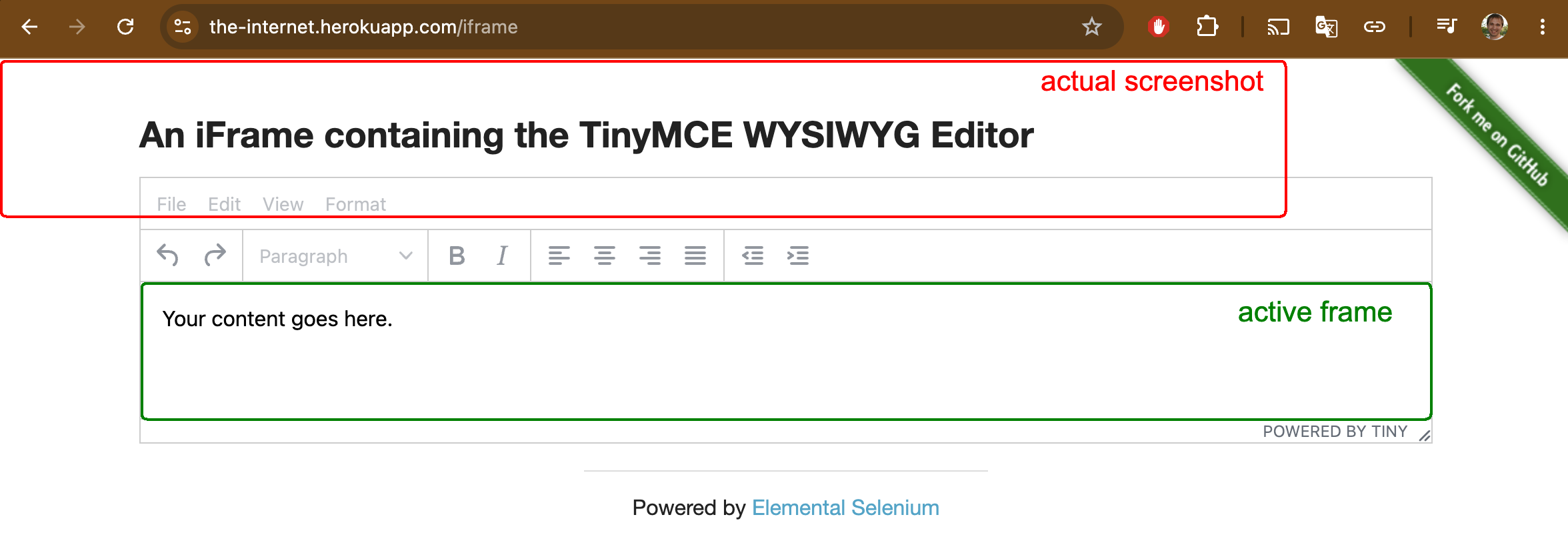
Fixed now — the page dimensions are obtained via the CDP command Page.getLayoutMetrics, which always
returns the top-level page dimensions, regardless of which frame you’re currently switched into.
See issue 3414 and PR 3420.
Orphaned browser after inNewBrowser with a custom config
If you call inNewBrowser(...) with a custom config, Selenide temporarily opens a separate browser for that
configuration, and is supposed to kill it afterwards. But in one case, the browser was left hanging open.
The leak is plugged: now after inNewBrowser(...) with a custom config, the browser is guaranteed to be closed —
no more zombie Chrome instances piling up in the background on CI.
See PR 3389.
StackOverflowError in using(...)
If you called these two methods back to back:
WebDriverRunner.setWebDriver(driver1);
WebDriverRunner.using(driver2, ...);
you could get a StackOverflowError. That used to happen. Now it’s fixed.
Thanks to Francisco Gonzalez for finding and fixing it!
See PR 3407.
Fixed long press and double tap in Appium
In mobile tests, the longPress/doubleTap methods with an offset used to calculate coordinates from the
element’s top-left corner instead of its center. Because of that, a tap with an offset could miss the target
element entirely — especially on small elements, where the difference between the center and the corner really matters.
Now long press and double tap with an offset are properly calculated from the element’s center — just like a regular tap.
Thanks to qwez for the fix!
See issue 3413, PR 3415 and PR 3416.
Upgraded Selenium from 4.46.0 to 4.47.0
And bumped the CDP version from v150 to v151.
Notable changes in Selenium itself:
- added a BiDi transport for generated BiDi modules, and fixed a bug where BiDi wasn’t
initialized for a
RemoteWebDriverbuilt via the builder; - fixed escaping in
By.className(),By.id()andBy.name(); - fixed GeckoDriver incorrectly rejecting system access passed via capabilities;
- dropped support for legacy FTP proxies.
See PR 3404 and the Selenium changelog.
Before September hits, update!
selenide.org
20.08.26